
Vamoos x Hubby eSIM: give every traveller free data
✅ For travel companies
Vamoos has partnered with Hubby eSIM so every traveller on your trips can now get 48 hours of free data, at no cost to you. It's a small gesture that makes a big impression.
In this article:
What is the Vamoos x Hubby eSIM?
Every trip comes with a free 1 GB of data for all travellers, so they are connected for the first 48 hours. Travellers have the option to extend this for their entire trip directly in the app.
The free eSIM can be installed and set up at home 7 days before departure, so it's ready the moment they land, they just connect on arrival.
On-screen instructions make set-up quick and simple. If a traveller runs into any trouble, they can contact Hubby eSIM directly in the Vamoos app, no need to come to you.
We've also put together a PDF guide with simple setup instructions, ready to email to travellers or add straight into their travel documents.
How to add the eSIM Application to your account
Download the eSIM Application from this link.
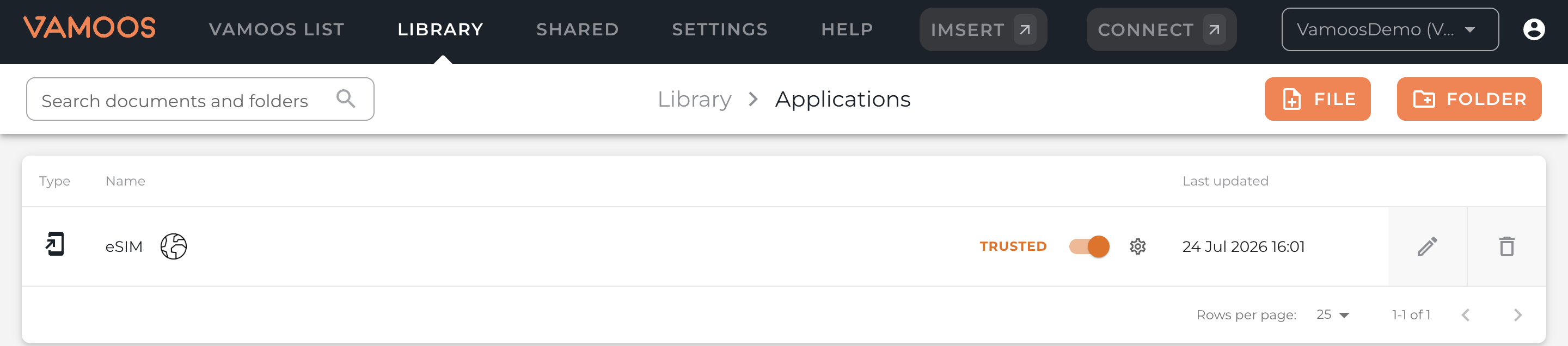
Upload it to your Library, in the Applications folder, and set it to Trusted. This ensures the eSIM Application can access trip information such as the destination, so it works correctly for your travellers.
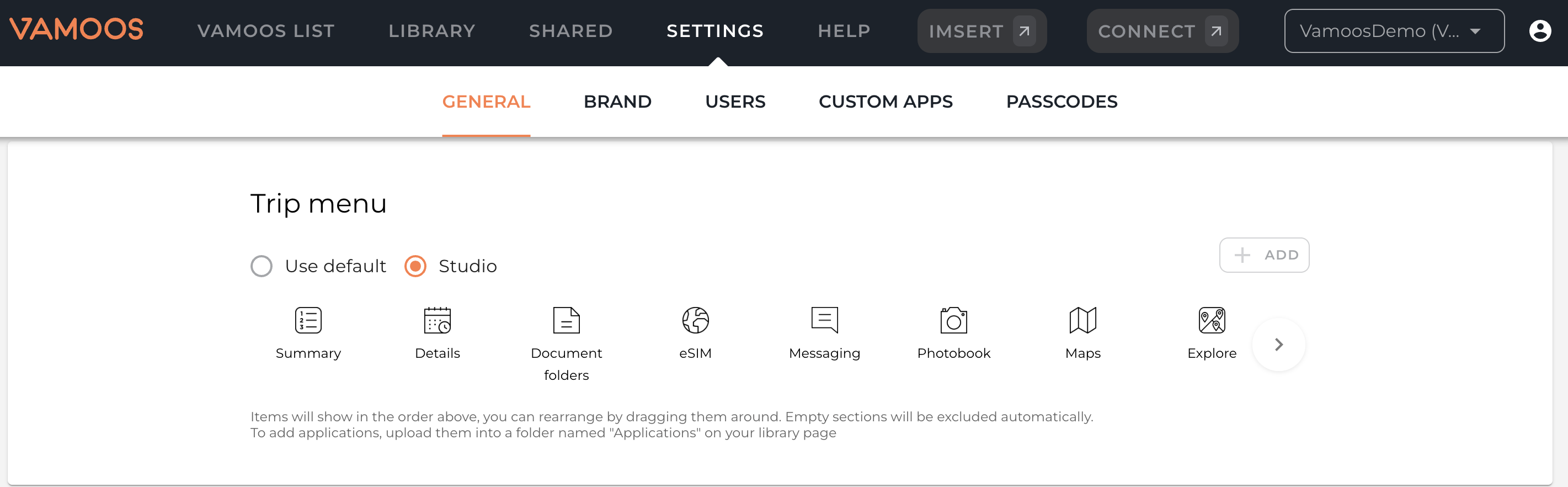
Add it to your Trip Menu (Settings > General > Trip Menu > Studio > +ADD) so it appears on the homescreen of every trip. You only need to do this once, there's no need to upload it trip by trip.
You can find the full steps, with screenshots, here.
Please note: in order for your travellers to access the Hubby eSIM, they'll be prompted to log in using their email address if they haven't already done so. On-screen instructions will guide them through this step.
Travellers must install the Hubby eSIM at home and activate when they land.
Letting your travellers know about their eSIM
In the app
Since the eSIM can be activated 7 days before departure, the best way to make sure travellers know it's ready is to set up a Shared Timed Notification once, and let it send automatically to every traveller on every trip going forward. No extra work required each time a new trip goes live. Please ensure the eSIM is installed at home and activated the moment travellers arrive at their destination.
Ready-made templates:
7 Days Before Departure - "Your eSIM is ready"
Your free eSIM is ready to install - get set up before you fly.
7 days to go! Install your free eSIM now so it's one less thing to think about.
Skip the airport Wi-Fi hunt - your free eSIM is ready to install.
Trip's coming up! Install your eSIM today and travel data-ready from day one.
Get ahead of the trip: install your free eSIM in the app now.
1 Day Before Departure - "Install reminder"
Almost time to go! Activate your eSIM now so you stay connected when you land.
Haven’t installed your eSIM yet? Do it now and save time at the airport.
Leaving tomorrow? Don't forget - your free eSIM is ready to install before you head to the airport.
Haven't installed it yet? Your free eSIM takes 2 minutes - do it now.
On Arrival - "Activate reminder"
Don't forget to connect and activate your eSIM.
24 Hours After Arrival - "Top up reminder"
Your free data is about to expire, top up now to stay connected.
Running low on data? Skip the search for Wi-Fi. Top up with 3GB, 5GB, or more and stay connected anywhere.
Don't lose connection - top up your eSIM and keep exploring worry-free.
Your free 1GB is nearly used up. Stay connected by topping up in seconds.
Keep the connection going - top up now and carry on exploring without interruption.
In your pre-departure emails
Travellers are far more likely to use the eSIM if they know it's there before they even open the app, so it's worth a mention wherever you're already talking to clients about Vamoos.
When you send your travellers app download instructions ahead of their trip, this is a natural place to flag that a free eSIM is waiting for them too. It's an easy way to add a bit of extra shine to your pre-departure communication, at no extra effort or cost to you.
To make this simple, we've updated our "How to share Vamoos with your clients" guide to include an optional line about the free eSIM alongside the existing app download instructions, feel free to use it as-is or adapt it to your own tone. Find this attached below.
FAQs
Q: Which destinations don't support the eSIM?
A: Burundi, Equatorial Guinea, Ethiopia, Haiti, Kiribati, Namibia, Nauru, New Caledonia, Northern Mariana Islands, Timor-Leste, Togo, Yemen, Zimbabwe
If you have any further questions or need help with this, contact us at support@vamoos.com.